Blog
Product updates, fresh ideas and a closer look at Omnitor
Keep up with product updates, explore how the platform works and find fresh ideas for your next campaign. From new features to practical examples, this is where we share what we’re building and learning.
Search...

·
Remco van den Brink
From insight to the next creative test
The campaign review is nearly finished. The team has looked at spend, clicks, and the strongest ads. Someone points to a creative and says, “We should do more of this.”
Everyone agrees. But what does “this” mean?
The product demonstration? The opening message? The person on screen? The offer?
Unless the team gets specific, the next brief leaves those questions to interpretation. The new creative may borrow the look of the previous ad without testing the element the team wanted to investigate.
Omnitor brings creatives, campaign context, and performance into one workspace to support that discussion. Here is how a team can use those views to move from a campaign review to a clear creative test.
1. Start with a question the team needs to answer
Before opening a report, agree on the decision ahead.
A team preparing its next product campaign might ask:
Should we produce more ads that show the product in use?
That question gives the review a focus. The team needs to find relevant examples, compare their results, and decide whether the evidence supports a test.
It also keeps the review manageable. There is no need to investigate every color, format, message, and audience at once.
Other useful starting questions might be:
Which previous concepts deserve another round of development?
Should we test a different call to action?
Which creative approaches should we explore in a new market?
Choose a question that can lead to a practical decision about the next campaign.
2. Find the relevant creatives
Use Omnitor’s creative overview to review live and historical ads across connected channels.
For the product-in-use question, the team looks for examples that show the product being used and examples that show it on its own. Seeing the actual assets helps everyone agree on what belongs in each group.
A campaign name might suggest a demonstration, but the creative could spend most of its time presenting an offer. Another ad might show the product in use without that detail appearing in its name.
Review the work before deciding what to compare.
Historical ads can provide useful examples, too. Keep their timing in mind: a creative from a seasonal promotion may have run under different conditions from the current campaign.
The aim is to assemble a relevant set of ads and understand what each one contains.
3. Check the campaign context
Once the team has found the creatives, it needs to check whether the comparison is reasonable.
Are the ads promoting the same product? Are they from the same market? Did they run on the same channel, with a similar objective and during a comparable period?
Omnitor’s campaign structure and taxonomy tools help teams organise that context. Naming validation can also surface missing or invalid fields that affect how ads appear in a report.
If some ads have no recognised format value, for example, a format-based report may leave out part of the work the team intended to review. Resolve relevant naming issues before relying on that grouping.
Consistent structure makes it easier to define the comparison. It does not make different campaigns equivalent. Audience, placement, budget, and delivery conditions still need consideration.
If the group is too broad, narrow it. A focused review of image ads for one product and market may be more useful than a ranking of every ad in the account.
4. Examine the result behind the pattern
The team can now review performance alongside the creative attributes.
Suppose the selected product-in-use ads have a higher CTR than the product-only images. Before turning that observation into a recommendation, look at how the result is distributed.
Is the difference visible across several creatives, or is one ad driving it? How much delivery did each group receive? Do the stronger ads share another feature, such as a different offer or opening message?
The number of creatives also matters. A small group may provide a promising direction without offering much evidence that the pattern will repeat.
Omnitor’s insights help teams find these relationships and review the examples behind them. The finding should stay close to what the data shows.
A useful observation would be:
“Within the selected campaign group, product-in-use creatives had a higher CTR than product-only images.”
That gives the team something to investigate without claiming that the presentation alone caused the difference.
5. Write a brief that isolates the question
The team decides to test whether showing the product in use improves response.
The brief should make that question explicit and identify the intended difference between versions. It should also reference the previous creatives that prompted the test.
For example:
Test question
Does showing the product in use improve click-through rate compared with showing the product on its own?Version A
A product-only image with the product clearly visible.Version B
An image showing a person using the same product.Keep consistent
The offer, headline, call to action, and destination. Use comparable audience and placement settings when setting up the test.Primary metric
Click-through rate, with downstream results reviewed before deciding whether to expand the approach.The brief gives the creative team room to execute while preserving the question the test is meant to answer.
If both versions also change the message, offer, and call to action, interpreting the outcome becomes harder. The team may learn which complete execution performed better, but it will have less evidence about the effect of showing the product in use.
6. Agree on the review before launch
Decide how the team will assess the test while writing the brief.
Which metric matters most? What campaign conditions need to stay comparable? When will the team review the results, and how will it decide whether enough evidence has accumulated?
There is no single review window that suits every campaign. Delivery volume, conversion timing, and the size of the difference all affect how confidently a result can be interpreted.
Avoid making the decision from an early percentage alone. A large relative difference can be based on very little activity.
The test should be run through the appropriate ad-platform setup. Omnitor supports the review by bringing the creatives, their context, and their performance together.
7. Bring the result back into the next brief
When the test is ready for review, return to the original question.
Did the product-in-use version have a higher CTR? Did other relevant metrics support the same decision? Were there delivery differences or setup changes that make the result harder to interpret?
The outcome may support expanding the approach. It may suggest another test. It may also be inconclusive.
All three are useful if the team records what happened clearly.
Capture the creatives reviewed, the campaign conditions, the reporting period, and the result. Then state the next decision:
Develop more variations of the approach.
Repeat the test in another context.
Investigate a different creative element.
Wait for more evidence before changing direction.
Accessible historical creatives and consistent campaign information make it easier to revisit that decision later. The next team member should be able to find the work and understand why it informed a brief.
Make the review part of how the team works
This process does not need to become a separate reporting exercise. It can fit into the campaign review the team already runs.
Start with a decision. Find the relevant creatives. Check their context. Examine the pattern. Agree on a test.
Omnitor supports those steps through its creative overview, taxonomy and naming tools, performance reporting, and creative insights. Each view helps answer a different part of the question.
The result is a more specific conversation between creative and performance teams. Everyone can see the examples, review the evidence, and understand what the next campaign is meant to explore.
A useful campaign review should leave the team knowing what it wants to learn next, and with a brief clear enough to test it.
Explore Omnitor to see how your team can connect creative reviews, performance insights, and the next campaign brief.
Read more

·
Michel Ypma
Why naming conventions matter
A team wants to compare video ads across three markets. It sounds like a straightforward reporting task.
One market uses “Video” in its campaign names. Another uses “VID.” The third includes the format in some names and leaves it out of others.
Before anyone can compare performance, someone has to decide which ads belong in the report.
That work rarely appears on a reporting dashboard. Yet it affects everything the dashboard shows: which ads are included, how they are grouped, and whether the comparison is useful.
Omnitor’s taxonomy and naming tools help teams organise campaign data consistently and identify issues that need attention. They give creative and performance reporting a clearer foundation.
The structure behind a useful report
Most reporting questions depend on being able to group ads correctly.
How did a product perform across markets? Which creative formats had a higher click-through rate? What did the team spend on a particular campaign theme?
To answer those questions, the relevant information needs to be present and recognisable.
A naming convention defines how that information should appear in a campaign, ad group, or ad name. A taxonomy defines the fields and values the team uses to describe its work.
For example, a team might use fields for market, product, format, and creative concept. Each field needs a shared meaning. If “format” refers to image or video, everyone should use it that way.
Without that agreement, two people can create names that look reasonable but describe the work differently. A report may then separate ads that belong together or combine ads that should be reviewed separately.
Small inconsistencies become reporting problems
Naming issues are often ordinary mistakes.
Someone copies a previous campaign name and misses a field. A new team member uses a different abbreviation. A local market introduces a value that has not been added to the shared dictionary.
Each issue may seem minor in isolation. Across hundreds or thousands of ads, those differences become harder to track.
The effect is not always obvious. A report can look complete while leaving out ads with missing or unrecognised values. A category can appear to have little spend because the same activity has been recorded under several names.
That makes it difficult to know whether a result reflects campaign performance or the way the data was organised.
The problem often surfaces during a review: someone notices a missing campaign, questions a total, or asks why an ad appears in the wrong group. The discussion pauses while the team checks the underlying data.
How Omnitor helps teams find the issues
Omnitor checks campaign naming against the defined taxonomy and surfaces mismatches for review.
The issues view identifies problems such as:
Missing mandatory fields: information required by the naming convention has not been included.
Unknown fields: a field appears in a name but is not recognised in the taxonomy dictionary.
Invalid values: a field contains a value that does not match the expected structure or accepted values.
The issue details help teams understand what needs attention. They can see the affected ads, platform, name level, field, and a description of the problem.
That context matters. “There is a naming error” leaves someone with another search to do. Knowing which field is missing, where it is missing, and which ads are affected makes the review more direct.
Teams can correct names in the source ad platform, then re-import the data or wait for the next sync. Where a new field or value is intentional, the team can review whether its shared taxonomy needs to change.
Separate errors from intentional changes
A taxonomy needs consistency, but campaigns evolve.
A team may enter a new market, introduce a product line, or start testing a new creative approach. The existing structure may need to accommodate that work.
When an unfamiliar value appears, the first question should be whether it is a mistake or a legitimate addition.
If it is a mistake, the campaign naming needs correction. If it is intentional, the team needs to agree on how to represent it consistently.
That distinction prevents people from forcing new activity into an old category simply to make a validation issue disappear.
Omnitor makes the mismatch visible. The team brings the context needed to resolve it.
A practical example: comparing formats across markets
Suppose a team wants to review image and video ads for a product launch in the Netherlands, Germany, and France.
Its agreed format values are
IMAGEandVIDEO. During setup, some ads useVID, while others omit the format entirely.Depending on how the report is built, filtering for
VIDEOcould miss part of the campaign. Comparing the remaining ads might give the team an incomplete view.A useful review would follow four steps.
1. Check the relevant naming issues.
Identify ads with missing or invalid format values and confirm that they belong to the campaign being reviewed.2. Verify the intended values.
Look at the affected creatives and campaign context. Confirm which ads are videos and which are images.3. Correct and refresh the data.
Update the names in the source platform, then bring the corrected information back into Omnitor through re-import or sync.4. Review the comparison again.
Check that the report now includes the intended ads and that the market and format groupings make sense.The corrected structure supports a more complete comparison. The team still needs to consider differences in spend, audience, placement, and campaign objective when interpreting the results.
Give the convention a clear owner
A naming convention is easier to maintain when someone is responsible for it.
That does not mean every campaign name needs central approval. It means the team knows where the agreed structure lives, who can clarify it, and how changes are handled.
A practical starting point is to agree on:
Which fields are required for reporting.
Which values are accepted for those fields.
How teams should request a new field or value.
Who reviews recurring naming issues.
Keep the structure focused on information the team actually uses. Every required field adds work during campaign setup and needs to be maintained.
A long convention with unclear definitions can create as much confusion as a short one with missing information. The aim is a structure people understand and can apply consistently.
Use naming health to guide the review
A naming-health summary gives teams a quick view of how much campaign data passes validation and where warnings or errors remain.
It is a useful starting point for deciding what to review. A missing market field, for example, deserves attention before a market comparison.
Passing validation does not guarantee that every detail is correct. An ad can contain an accepted market value that was
Read more

·
Ali Diouri
From attributes to insights
A campaign report shows that one ad has a higher click-through rate than another. You open both creatives and start comparing them.
One shows a person using the product. The other shows the product on its own. The colors are different. So are the opening message and the call to action.
Which of those differences is worth exploring?
With two ads, the team can discuss what it sees. Across hundreds of creatives, that becomes harder. Someone needs to review the work, describe its characteristics, and connect those descriptions to performance.
Omnitor’s creative intelligence helps organise that investigation. It brings creative attributes into the reporting view, giving teams a way to explore what their ads have in common and how those characteristics relate to results.
Give the creative itself a place in the data
Campaign data describes where and how an ad runs. It can tell you the market, channel, campaign, and format.
Creative attributes describe the content of the ad.
A product image and a lifestyle image may sit within the same campaign and use the same format. Visually, they take different approaches. A campaign-level report can miss that distinction unless the creative content is described as well.
Omnitor organises creative analysis around attributes such as:
Subjects: what appears in the creative, such as a person, product, or food.
Products and services: what the ad features or promotes.
Dominant colors: the main colors present in the creative.
Mood: the tone the creative conveys, such as calm or energetic.
Style: the approach used, such as lifestyle imagery or a product shot.
Calls to action: the action the ad asks someone to take.
These descriptions give teams more ways to explore their creative collection. Instead of reviewing only individual ads or campaign names, they can look across ads that share a characteristic.
Connect three kinds of information
Creative intelligence becomes useful when the attributes stay connected to the campaign context and the results.
Each contributes something different.
The creative tells you what people saw.
The asset and its attributes describe the content, message, and presentation.The campaign structure tells you where it belongs.
Fields such as market, channel, and format help define the group you are reviewing.Performance tells you what happened.
Metrics such as impressions, clicks, spend, and CTR show how the ads performed within the selected reporting period.Omnitor brings these views together. A team can move from a performance question to a group of creatives, then examine the characteristics behind that group.
For example, “Which ads had the highest CTR?” can lead to a more focused question: “Among image ads for this product and market, how did product shots compare with lifestyle imagery?”
The second question gives the team a clearer basis for investigation.
Look for patterns across the work
The insights view lets teams review creative attributes alongside performance measures and the number of creatives represented.
That last detail matters. A category represented by one ad offers a different amount of evidence from a category represented by several dozen.
Suppose a report shows that creatives featuring people outdoors have a higher CTR than the account average. The finding is worth a closer look, but there are several questions to answer before using it in a brief.
How many creatives are in that group? Did one ad account for most of the delivery? Were they promoting the same product? Did they run in similar markets and placements? Were they active during the same period?
Reviewing the underlying creatives also matters. Two ads can share an attribute while differing in almost every other respect. “Person outdoors” might describe both a product demonstration and a short customer story.
The attribute helps you find the group. Looking at the ads helps you understand it.
Read a comparison precisely
Consider an illustrative report showing:
0.58% CTR for a selected group of outdoor lifestyle creatives.
0.42% CTR for the account average during the same reporting period.
The difference is 0.16 percentage points, or approximately 38% higher relative to the account average.
That is an observed comparison. It does not mean that changing an indoor scene to an outdoor scene will increase CTR by 38%.
The outdoor creatives may have reached a different audience. They may have used a stronger offer or received more delivery in a placement where response rates are higher. Several characteristics could be contributing to the result.
The comparison is also against the account average, which may include a broad mix of campaigns. Comparing with a more closely matched group could produce a different result.
Omnitor gives teams a way to surface and examine these relationships. The interpretation still needs to account for the conditions in which the ads ran.
Treat creative descriptions as something to review
Some attributes are straightforward to recognise. Others involve interpretation.
An ad may clearly contain a product, but its mood could reasonably be described as both calm and premium. A creative may combine lifestyle imagery with a product demonstration. A video may change its setting and message as it progresses.
Those descriptions are useful for organising the work, but they should be read alongside the actual creative. A label cannot capture every detail of an ad.
When a pattern looks important, open representative examples and check whether the group reflects the question you are trying to answer. If the ads vary widely, narrow the comparison or treat the finding as an early indication.
This is especially important for attributes such as mood and style, where the boundaries are less clear than a campaign field such as market.
Turn a pattern into a specific question
A useful finding gives the team something concrete to investigate.
Imagine that product-in-use creatives appear to have a higher CTR than product-only images in a selected report. After reviewing the ads and their campaign context, the team decides the difference is worth testing.
The next brief could ask for two executions of the same concept:
Version A: show the product on its own.
Version B: show a person using the product.The team keeps the offer, message, call to action, audience, and placement as consistent as practical. It agrees on the primary metric before launch and considers other relevant results when reviewing the test.
The question is now specific: does showing the product in use improve response under these conditions?
That is more actionable than a broad instruction to “make more lifestyle content.” It also gives the team a clearer way to interpret the next set of results.
Choose the metric that fits the question
Creative performance has several dimensions. A higher CTR can be useful, but it does not automatically mean an ad generated more valuable visits or more conversions.
The metric should follow the question.
If the team is testing whether an opening earns more attention and response, CTR may be relevant. If it is reviewing a call to action intended to drive purchases, conversion performance may be more important.
Keep metric names clear when sharing findings. Click-through rate and conversion rate answer different questions, and a percentage without that context is easy to misread.
The same applies to the comparison: specify whether a result is being measured against an account average, another creative group, or a previous period.
Make the finding useful to the next person
The most useful outcome of creative analysis is a finding someone else can understand and review.
It should identify the group of ads, the reporting period, the metric, and the comparison. It should link back to the creatives and make clear what remains uncertain.
That gives a designer, media buyer, or marketing lead enough context to decide what to do next.
Omnitor connects creative attributes with campaign information and performance so teams can build that understanding
Read more

·
Ali Diouri
Your next brief starts with past work
A new campaign brief often begins with a search through old work. Someone remembers a video that performed well. Someone else has a screenshot from a previous launch. There is a report somewhere, but the campaign names do not make it easy to find the right creative.
The team has plenty of material. Getting it into a useful view takes time.
As campaigns move across channels, markets, and teams, that problem grows. Ads sit in different platforms. Results live in reports. The context behind a creative often stays with the person who worked on it.
Omnitor’s creative overview gives teams a shared place to see live and historical ads across connected channels, with performance information alongside the creative. It makes previous work easier to find, review, and bring into the next decision.
See the creative behind the campaign name
A campaign name can tell you a lot when the naming convention is consistent. It might identify the market, product, format, or objective.
It still cannot show you the ad.
Two creatives can share those details and take very different approaches. One might open with a product demonstration. Another might lead with a person speaking to camera. A third might use a product image and a short offer.
Those differences matter in a creative review. They are difficult to assess from a spreadsheet alone.
Omnitor puts the ads in view, so teams can recognise the work they are discussing. Images and video previews sit alongside performance information, making it easier to connect a result with the creative that produced it.
That is particularly useful when the people reviewing the campaign were not involved in producing every asset. They can look at the work directly, rather than relying on a filename or someone else’s description.
Keep past campaigns useful
Once a campaign ends, attention moves quickly to the next launch. Its creatives may still be available in the original platform, but they can become harder to find and less likely to be revisited.
That leaves useful work out of the conversation.
An earlier campaign may contain a product demonstration worth updating, a message that deserves another test, or a visual approach the team has not used recently. It may also show which ideas have already been tried.
Omnitor keeps historical creatives accessible alongside live ads. Teams can revisit previous work without starting a separate search in each connected platform.
This matters beyond finding strong performers. An ad with weaker results can still be worth reviewing. Perhaps the offer was unclear, the product appeared too late, or the creative was used in a campaign with a different objective. Seeing the asset and its results together gives the team a starting point for that discussion.
Past work becomes a reference the team can use, rather than a folder it occasionally remembers to open.
Review across channels without losing context
Marketing teams often adapt the same concept for several channels. A product launch might include a short video, a static image, and several variations in message or format.
Reviewing those creatives together can reveal how the idea changed between placements. It can also help teams notice when a particular execution deserves a closer look.
Omnitor brings creatives from connected channels into one workspace, reducing the need to move between platforms just to assemble that view.
The channel context still matters. A higher CTR on one platform does not automatically make a creative better than an ad on another. Audiences, placements, objectives, and delivery conditions can differ.
A shared overview helps teams find the ads they want to compare. The next step is to check whether the comparison makes sense.
For example, a team could start by reviewing image ads for the same product and market, then look at how their messages and results differ. That is a more useful discussion than ranking every ad across every channel and treating the top result as a formula.
Give feedback people can act on
Creative feedback becomes more specific when everyone can see the same examples.
“Make it more engaging” leaves a lot open to interpretation. A review of actual ads gives the team something concrete to discuss:
How quickly does the product appear?
Does the opening show the benefit clearly?
How much text is on screen?
Which message does the call to action follow?
What changed between the versions?
The overview does not answer every question on its own. It provides the material for a better review.
A performance marketer can point to the result they want to investigate. A designer can examine the visual treatment. A copywriter can compare the messages. Together, they can decide which differences deserve further analysis or a new test.
The useful outcome is a specific decision, with examples to support it.
Use the overview before writing the brief
Consider a team preparing a new campaign for a skincare product.
Before developing new concepts, they review relevant live and historical creatives in Omnitor. They find product-only images, routine videos, and ads focused on ingredients.
With those examples in view, the team can work through a few practical questions.
What have we already tried?
Reviewing the collection helps the team avoid repeating an idea simply because nobody remembered the earlier version.Which results need a closer look?
Performance alongside the ads helps identify examples worth investigating. The team can then check the campaign context before drawing conclusions.Which creative differences could we test?
The discussion might focus on showing the product in use, changing the opening message, or making the call to action more direct.What should the next brief include?
Instead of attaching a loose collection of inspiration, the team can reference specific past creatives and explain what it wants to retain or change.A brief might then say:
“Develop two versions of the routine concept. Keep the product, offer, and call to action consistent. In one version, show the product in use immediately. In the other, introduce the routine before showing the product. We want to compare how the opening affects response.”
That brief has a clear question behind it. Previous work helped the team get there.
Make creative knowledge easier to share
Without a shared view, knowledge of past campaigns often depends on individual memory.
The person who managed a launch may remember which variations ran. The designer may know where the original files are. The analyst may have the report that explains the results.
That arrangement becomes fragile as teams grow or responsibilities change.
An accessible creative history gives more people a way into the work. New team members can review earlier campaigns. Colleagues across markets can see what has been used. Creative and performance teams can refer to the same ads during a discussion.
Omnitor brings that visibility into the reporting workflow, connecting the work people recognise with the results they need to assess.
Before starting your next creative brief, look at the ads you already have. The useful question may come from a difference between two versions, a result nobody followed up on, or a concept worth testing again.
Explore Omnitor’s creative overview to see live and historical ads alongside their performance.
Read more
·
Remco van den Brink
See creative performance clearly
You open a campaign report and find an ad with a strong click-through rate. The numbers tell you it performed well. To understand the creative behind those numbers, you open another tab, search for the ad, and try to piece together its campaign context.
What did it show? Which message did it use? Was it a video or an image? Have you run something similar before?
These are everyday questions for marketing teams. Answering them often takes more work than it should.
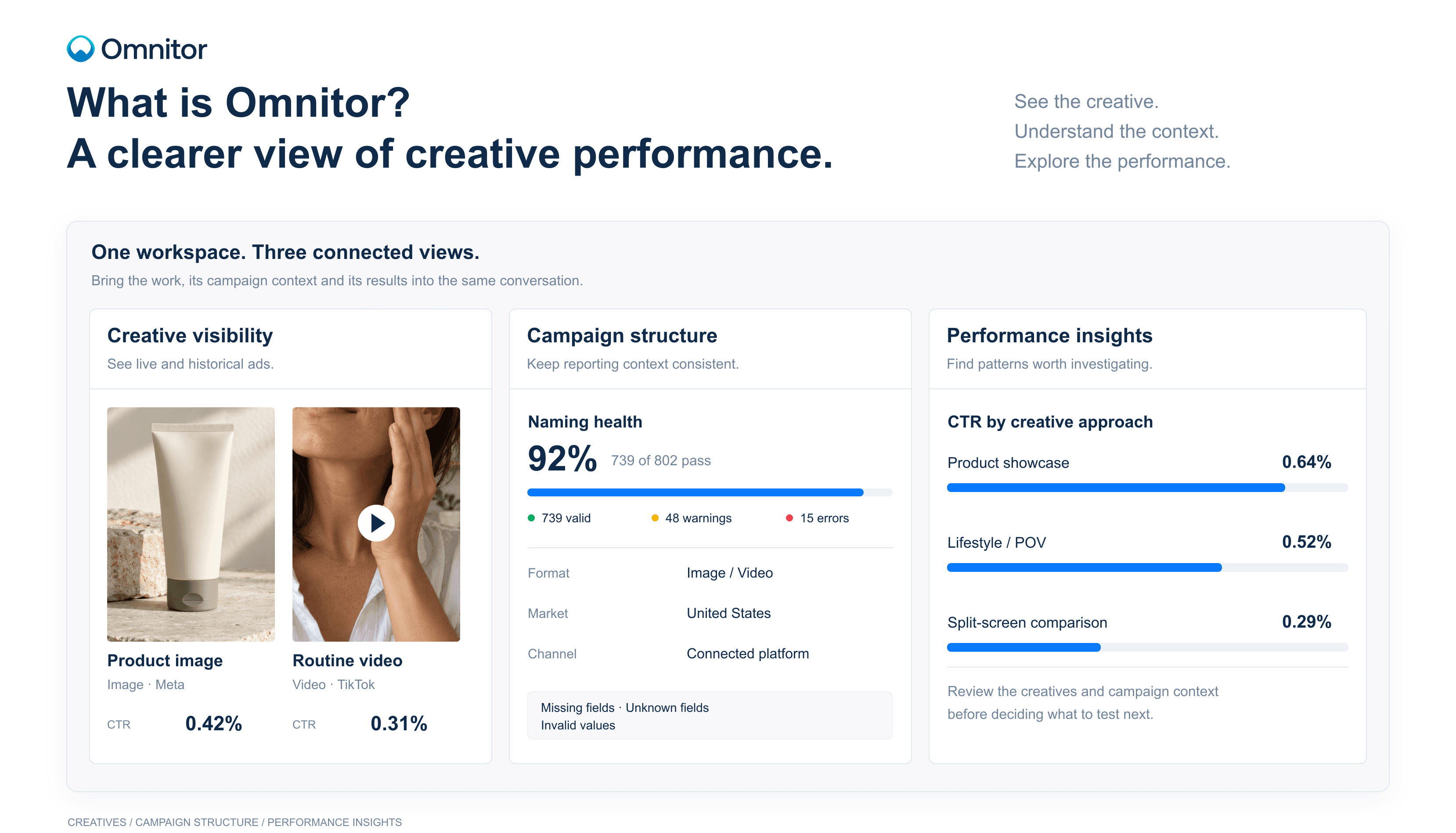
Omnitor brings creatives, campaign structure, and performance data into one workspace. It helps teams see what is running, understand how their ads differ, and use what they learn to plan the next campaign.
Start with the ad itself
Campaign reports usually start with rows of names and numbers. Creative teams tend to start with the work: an image, a video, a product shot, a headline.
Both views matter. Looking at them together makes a report much more useful.
Omnitor gives teams a visual overview of live and historical creatives across connected channels, with performance information alongside the ads. You can review the actual creative while looking at its results, rather than trying to recognise it from a campaign name.
That changes how a team can approach a review. Instead of passing around screenshots and asking which ad belongs to which result, everyone has a shared place to look.
Historical creatives matter here, too. A campaign may have ended, but the work can still inform a new brief. Being able to find and compare past ads helps teams keep those lessons accessible.
Give campaign data a consistent structure
A visual overview is a useful starting point. Meaningful comparisons also need consistent campaign information.
Consider a team reviewing product videos across several markets. One market uses “Video” in its naming convention. Another uses “VID.” A third leaves the format out entirely. Before anyone can compare results, someone has to work out which ads belong in the report.
Small inconsistencies create a lot of manual work as campaigns grow.
Omnitor’s taxonomy and naming tools help teams define a consistent structure for campaign data. Validation surfaces issues such as missing required fields, unknown fields, and invalid values, so teams can review the problems affecting their reporting.
The purpose is practical: make it easier to group the right ads, compare them on a consistent basis, and understand what a report includes.
Structure also gives creative results context. An ad’s format, market, channel, and campaign details can all matter when interpreting its performance. Keeping that information organised helps teams ask more precise questions.
Look beyond individual winners
Finding a strong ad is useful. Finding a pattern across several ads can give a team something more specific to investigate.
Do product demonstrations tend to have a higher click-through rate? How do image ads compare with video? Are certain calls to action associated with stronger results? Does a pattern appear across channels, or only in one?
Omnitor’s creative insights let teams explore performance alongside attributes such as subjects, products, dominant colors, mood, style, and calls to action.
These attributes provide another way to organise and compare the work. Alongside campaign-level reporting, teams can look at the characteristics of the creatives themselves.
A finding might show that ads featuring people outdoors have a higher CTR within a selected group. That gives the team a direction to explore. It does not establish that the outdoor setting caused the difference. Audience, placement, spend, and other campaign conditions may also have played a part.
The value is in making those patterns easier to see and investigate.
Bring creative and performance teams into the same conversation
Creative and performance teams often approach a campaign from different starting points.
A designer may want to understand which visual treatments are worth developing. A media buyer may be focused on cost and response. A marketing lead may need to decide where the team should put its next round of production effort.
Those questions are connected.
Omnitor brings the creative, its campaign context, and its results together so teams can discuss them from a shared view. A performance review can include the actual ads. A creative discussion can include the numbers. A new brief can reference previous work and the findings behind a proposed test.
This gives feedback more substance. “We need more ads like this” can become a discussion about which elements to retain, which to change, and what the team wants to learn.
Turn a finding into a test
Suppose a team notices that product demonstration videos have a higher CTR than product-only images in a report.
There are several possible explanations. The format may matter. So might the audience, the offer, or the way the product is presented. The next step is to review the creatives and their campaign context before deciding what to test.
The team could then create two versions of the same concept: one showing the product in use and one showing the product on its own. Keeping the audience, offer, and placement as consistent as practical would make the comparison more informative.
Omnitor supports the work around that decision: finding the relevant creatives, checking their structure, comparing performance, and identifying the pattern that prompted the test.
The team still applies its judgment. The difference is that the discussion starts with information everyone can review.
Where Omnitor fits
Omnitor is built for teams that need to understand creative performance across campaigns and connected media platforms.
It brings together three parts of that work:
Creative visibility: see and revisit the ads your team runs.
Campaign structure: keep naming and taxonomy consistent enough to support useful reporting.
Performance insights: compare results and explore patterns across creative attributes.
Together, these help teams move from reviewing what happened to deciding what deserves another look, and what to test next.
Explore Omnitor to see how creatives, campaign data, and performance come together in one workspace.
Read more
·
Remco van den Brink
From insight to the next creative test
The campaign review is nearly finished. The team has looked at spend, clicks, and the strongest ads. Someone points to a creative and says, “We should do more of this.”
Everyone agrees. But what does “this” mean?
The product demonstration? The opening message? The person on screen? The offer?
Unless the team gets specific, the next brief leaves those questions to interpretation. The new creative may borrow the look of the previous ad without testing the element the team wanted to investigate.
Omnitor brings creatives, campaign context, and performance into one workspace to support that discussion. Here is how a team can use those views to move from a campaign review to a clear creative test.
1. Start with a question the team needs to answer
Before opening a report, agree on the decision ahead.
A team preparing its next product campaign might ask:
Should we produce more ads that show the product in use?
That question gives the review a focus. The team needs to find relevant examples, compare their results, and decide whether the evidence supports a test.
It also keeps the review manageable. There is no need to investigate every color, format, message, and audience at once.
Other useful starting questions might be:
Which previous concepts deserve another round of development?
Should we test a different call to action?
Which creative approaches should we explore in a new market?
Choose a question that can lead to a practical decision about the next campaign.
2. Find the relevant creatives
Use Omnitor’s creative overview to review live and historical ads across connected channels.
For the product-in-use question, the team looks for examples that show the product being used and examples that show it on its own. Seeing the actual assets helps everyone agree on what belongs in each group.
A campaign name might suggest a demonstration, but the creative could spend most of its time presenting an offer. Another ad might show the product in use without that detail appearing in its name.
Review the work before deciding what to compare.
Historical ads can provide useful examples, too. Keep their timing in mind: a creative from a seasonal promotion may have run under different conditions from the current campaign.
The aim is to assemble a relevant set of ads and understand what each one contains.
3. Check the campaign context
Once the team has found the creatives, it needs to check whether the comparison is reasonable.
Are the ads promoting the same product? Are they from the same market? Did they run on the same channel, with a similar objective and during a comparable period?
Omnitor’s campaign structure and taxonomy tools help teams organise that context. Naming validation can also surface missing or invalid fields that affect how ads appear in a report.
If some ads have no recognised format value, for example, a format-based report may leave out part of the work the team intended to review. Resolve relevant naming issues before relying on that grouping.
Consistent structure makes it easier to define the comparison. It does not make different campaigns equivalent. Audience, placement, budget, and delivery conditions still need consideration.
If the group is too broad, narrow it. A focused review of image ads for one product and market may be more useful than a ranking of every ad in the account.
4. Examine the result behind the pattern
The team can now review performance alongside the creative attributes.
Suppose the selected product-in-use ads have a higher CTR than the product-only images. Before turning that observation into a recommendation, look at how the result is distributed.
Is the difference visible across several creatives, or is one ad driving it? How much delivery did each group receive? Do the stronger ads share another feature, such as a different offer or opening message?
The number of creatives also matters. A small group may provide a promising direction without offering much evidence that the pattern will repeat.
Omnitor’s insights help teams find these relationships and review the examples behind them. The finding should stay close to what the data shows.
A useful observation would be:
“Within the selected campaign group, product-in-use creatives had a higher CTR than product-only images.”
That gives the team something to investigate without claiming that the presentation alone caused the difference.
5. Write a brief that isolates the question
The team decides to test whether showing the product in use improves response.
The brief should make that question explicit and identify the intended difference between versions. It should also reference the previous creatives that prompted the test.
For example:
Test question
Does showing the product in use improve click-through rate compared with showing the product on its own?Version A
A product-only image with the product clearly visible.Version B
An image showing a person using the same product.Keep consistent
The offer, headline, call to action, and destination. Use comparable audience and placement settings when setting up the test.Primary metric
Click-through rate, with downstream results reviewed before deciding whether to expand the approach.The brief gives the creative team room to execute while preserving the question the test is meant to answer.
If both versions also change the message, offer, and call to action, interpreting the outcome becomes harder. The team may learn which complete execution performed better, but it will have less evidence about the effect of showing the product in use.
6. Agree on the review before launch
Decide how the team will assess the test while writing the brief.
Which metric matters most? What campaign conditions need to stay comparable? When will the team review the results, and how will it decide whether enough evidence has accumulated?
There is no single review window that suits every campaign. Delivery volume, conversion timing, and the size of the difference all affect how confidently a result can be interpreted.
Avoid making the decision from an early percentage alone. A large relative difference can be based on very little activity.
The test should be run through the appropriate ad-platform setup. Omnitor supports the review by bringing the creatives, their context, and their performance together.
7. Bring the result back into the next brief
When the test is ready for review, return to the original question.
Did the product-in-use version have a higher CTR? Did other relevant metrics support the same decision? Were there delivery differences or setup changes that make the result harder to interpret?
The outcome may support expanding the approach. It may suggest another test. It may also be inconclusive.
All three are useful if the team records what happened clearly.
Capture the creatives reviewed, the campaign conditions, the reporting period, and the result. Then state the next decision:
Develop more variations of the approach.
Repeat the test in another context.
Investigate a different creative element.
Wait for more evidence before changing direction.
Accessible historical creatives and consistent campaign information make it easier to revisit that decision later. The next team member should be able to find the work and understand why it informed a brief.
Make the review part of how the team works
This process does not need to become a separate reporting exercise. It can fit into the campaign review the team already runs.
Start with a decision. Find the relevant creatives. Check their context. Examine the pattern. Agree on a test.
Omnitor supports those steps through its creative overview, taxonomy and naming tools, performance reporting, and creative insights. Each view helps answer a different part of the question.
The result is a more specific conversation between creative and performance teams. Everyone can see the examples, review the evidence, and understand what the next campaign is meant to explore.
A useful campaign review should leave the team knowing what it wants to learn next, and with a brief clear enough to test it.
Explore Omnitor to see how your team can connect creative reviews, performance insights, and the next campaign brief.
Read more
·
Michel Ypma
Why naming conventions matter
A team wants to compare video ads across three markets. It sounds like a straightforward reporting task.
One market uses “Video” in its campaign names. Another uses “VID.” The third includes the format in some names and leaves it out of others.
Before anyone can compare performance, someone has to decide which ads belong in the report.
That work rarely appears on a reporting dashboard. Yet it affects everything the dashboard shows: which ads are included, how they are grouped, and whether the comparison is useful.
Omnitor’s taxonomy and naming tools help teams organise campaign data consistently and identify issues that need attention. They give creative and performance reporting a clearer foundation.
The structure behind a useful report
Most reporting questions depend on being able to group ads correctly.
How did a product perform across markets? Which creative formats had a higher click-through rate? What did the team spend on a particular campaign theme?
To answer those questions, the relevant information needs to be present and recognisable.
A naming convention defines how that information should appear in a campaign, ad group, or ad name. A taxonomy defines the fields and values the team uses to describe its work.
For example, a team might use fields for market, product, format, and creative concept. Each field needs a shared meaning. If “format” refers to image or video, everyone should use it that way.
Without that agreement, two people can create names that look reasonable but describe the work differently. A report may then separate ads that belong together or combine ads that should be reviewed separately.
Small inconsistencies become reporting problems
Naming issues are often ordinary mistakes.
Someone copies a previous campaign name and misses a field. A new team member uses a different abbreviation. A local market introduces a value that has not been added to the shared dictionary.
Each issue may seem minor in isolation. Across hundreds or thousands of ads, those differences become harder to track.
The effect is not always obvious. A report can look complete while leaving out ads with missing or unrecognised values. A category can appear to have little spend because the same activity has been recorded under several names.
That makes it difficult to know whether a result reflects campaign performance or the way the data was organised.
The problem often surfaces during a review: someone notices a missing campaign, questions a total, or asks why an ad appears in the wrong group. The discussion pauses while the team checks the underlying data.
How Omnitor helps teams find the issues
Omnitor checks campaign naming against the defined taxonomy and surfaces mismatches for review.
The issues view identifies problems such as:
Missing mandatory fields: information required by the naming convention has not been included.
Unknown fields: a field appears in a name but is not recognised in the taxonomy dictionary.
Invalid values: a field contains a value that does not match the expected structure or accepted values.
The issue details help teams understand what needs attention. They can see the affected ads, platform, name level, field, and a description of the problem.
That context matters. “There is a naming error” leaves someone with another search to do. Knowing which field is missing, where it is missing, and which ads are affected makes the review more direct.
Teams can correct names in the source ad platform, then re-import the data or wait for the next sync. Where a new field or value is intentional, the team can review whether its shared taxonomy needs to change.
Separate errors from intentional changes
A taxonomy needs consistency, but campaigns evolve.
A team may enter a new market, introduce a product line, or start testing a new creative approach. The existing structure may need to accommodate that work.
When an unfamiliar value appears, the first question should be whether it is a mistake or a legitimate addition.
If it is a mistake, the campaign naming needs correction. If it is intentional, the team needs to agree on how to represent it consistently.
That distinction prevents people from forcing new activity into an old category simply to make a validation issue disappear.
Omnitor makes the mismatch visible. The team brings the context needed to resolve it.
A practical example: comparing formats across markets
Suppose a team wants to review image and video ads for a product launch in the Netherlands, Germany, and France.
Its agreed format values are
IMAGEandVIDEO. During setup, some ads useVID, while others omit the format entirely.Depending on how the report is built, filtering for
VIDEOcould miss part of the campaign. Comparing the remaining ads might give the team an incomplete view.A useful review would follow four steps.
1. Check the relevant naming issues.
Identify ads with missing or invalid format values and confirm that they belong to the campaign being reviewed.2. Verify the intended values.
Look at the affected creatives and campaign context. Confirm which ads are videos and which are images.3. Correct and refresh the data.
Update the names in the source platform, then bring the corrected information back into Omnitor through re-import or sync.4. Review the comparison again.
Check that the report now includes the intended ads and that the market and format groupings make sense.The corrected structure supports a more complete comparison. The team still needs to consider differences in spend, audience, placement, and campaign objective when interpreting the results.
Give the convention a clear owner
A naming convention is easier to maintain when someone is responsible for it.
That does not mean every campaign name needs central approval. It means the team knows where the agreed structure lives, who can clarify it, and how changes are handled.
A practical starting point is to agree on:
Which fields are required for reporting.
Which values are accepted for those fields.
How teams should request a new field or value.
Who reviews recurring naming issues.
Keep the structure focused on information the team actually uses. Every required field adds work during campaign setup and needs to be maintained.
A long convention with unclear definitions can create as much confusion as a short one with missing information. The aim is a structure people understand and can apply consistently.
Use naming health to guide the review
A naming-health summary gives teams a quick view of how much campaign data passes validation and where warnings or errors remain.
It is a useful starting point for deciding what to review. A missing market field, for example, deserves attention before a market comparison.
Passing validation does not guarantee that every detail is correct. An ad can contain an accepted market value that was
Read more
·
Ali Diouri
From attributes to insights
A campaign report shows that one ad has a higher click-through rate than another. You open both creatives and start comparing them.
One shows a person using the product. The other shows the product on its own. The colors are different. So are the opening message and the call to action.
Which of those differences is worth exploring?
With two ads, the team can discuss what it sees. Across hundreds of creatives, that becomes harder. Someone needs to review the work, describe its characteristics, and connect those descriptions to performance.
Omnitor’s creative intelligence helps organise that investigation. It brings creative attributes into the reporting view, giving teams a way to explore what their ads have in common and how those characteristics relate to results.
Give the creative itself a place in the data
Campaign data describes where and how an ad runs. It can tell you the market, channel, campaign, and format.
Creative attributes describe the content of the ad.
A product image and a lifestyle image may sit within the same campaign and use the same format. Visually, they take different approaches. A campaign-level report can miss that distinction unless the creative content is described as well.
Omnitor organises creative analysis around attributes such as:
Subjects: what appears in the creative, such as a person, product, or food.
Products and services: what the ad features or promotes.
Dominant colors: the main colors present in the creative.
Mood: the tone the creative conveys, such as calm or energetic.
Style: the approach used, such as lifestyle imagery or a product shot.
Calls to action: the action the ad asks someone to take.
These descriptions give teams more ways to explore their creative collection. Instead of reviewing only individual ads or campaign names, they can look across ads that share a characteristic.
Connect three kinds of information
Creative intelligence becomes useful when the attributes stay connected to the campaign context and the results.
Each contributes something different.
The creative tells you what people saw.
The asset and its attributes describe the content, message, and presentation.The campaign structure tells you where it belongs.
Fields such as market, channel, and format help define the group you are reviewing.Performance tells you what happened.
Metrics such as impressions, clicks, spend, and CTR show how the ads performed within the selected reporting period.Omnitor brings these views together. A team can move from a performance question to a group of creatives, then examine the characteristics behind that group.
For example, “Which ads had the highest CTR?” can lead to a more focused question: “Among image ads for this product and market, how did product shots compare with lifestyle imagery?”
The second question gives the team a clearer basis for investigation.
Look for patterns across the work
The insights view lets teams review creative attributes alongside performance measures and the number of creatives represented.
That last detail matters. A category represented by one ad offers a different amount of evidence from a category represented by several dozen.
Suppose a report shows that creatives featuring people outdoors have a higher CTR than the account average. The finding is worth a closer look, but there are several questions to answer before using it in a brief.
How many creatives are in that group? Did one ad account for most of the delivery? Were they promoting the same product? Did they run in similar markets and placements? Were they active during the same period?
Reviewing the underlying creatives also matters. Two ads can share an attribute while differing in almost every other respect. “Person outdoors” might describe both a product demonstration and a short customer story.
The attribute helps you find the group. Looking at the ads helps you understand it.
Read a comparison precisely
Consider an illustrative report showing:
0.58% CTR for a selected group of outdoor lifestyle creatives.
0.42% CTR for the account average during the same reporting period.
The difference is 0.16 percentage points, or approximately 38% higher relative to the account average.
That is an observed comparison. It does not mean that changing an indoor scene to an outdoor scene will increase CTR by 38%.
The outdoor creatives may have reached a different audience. They may have used a stronger offer or received more delivery in a placement where response rates are higher. Several characteristics could be contributing to the result.
The comparison is also against the account average, which may include a broad mix of campaigns. Comparing with a more closely matched group could produce a different result.
Omnitor gives teams a way to surface and examine these relationships. The interpretation still needs to account for the conditions in which the ads ran.
Treat creative descriptions as something to review
Some attributes are straightforward to recognise. Others involve interpretation.
An ad may clearly contain a product, but its mood could reasonably be described as both calm and premium. A creative may combine lifestyle imagery with a product demonstration. A video may change its setting and message as it progresses.
Those descriptions are useful for organising the work, but they should be read alongside the actual creative. A label cannot capture every detail of an ad.
When a pattern looks important, open representative examples and check whether the group reflects the question you are trying to answer. If the ads vary widely, narrow the comparison or treat the finding as an early indication.
This is especially important for attributes such as mood and style, where the boundaries are less clear than a campaign field such as market.
Turn a pattern into a specific question
A useful finding gives the team something concrete to investigate.
Imagine that product-in-use creatives appear to have a higher CTR than product-only images in a selected report. After reviewing the ads and their campaign context, the team decides the difference is worth testing.
The next brief could ask for two executions of the same concept:
Version A: show the product on its own.
Version B: show a person using the product.The team keeps the offer, message, call to action, audience, and placement as consistent as practical. It agrees on the primary metric before launch and considers other relevant results when reviewing the test.
The question is now specific: does showing the product in use improve response under these conditions?
That is more actionable than a broad instruction to “make more lifestyle content.” It also gives the team a clearer way to interpret the next set of results.
Choose the metric that fits the question
Creative performance has several dimensions. A higher CTR can be useful, but it does not automatically mean an ad generated more valuable visits or more conversions.
The metric should follow the question.
If the team is testing whether an opening earns more attention and response, CTR may be relevant. If it is reviewing a call to action intended to drive purchases, conversion performance may be more important.
Keep metric names clear when sharing findings. Click-through rate and conversion rate answer different questions, and a percentage without that context is easy to misread.
The same applies to the comparison: specify whether a result is being measured against an account average, another creative group, or a previous period.
Make the finding useful to the next person
The most useful outcome of creative analysis is a finding someone else can understand and review.
It should identify the group of ads, the reporting period, the metric, and the comparison. It should link back to the creatives and make clear what remains uncertain.
That gives a designer, media buyer, or marketing lead enough context to decide what to do next.
Omnitor connects creative attributes with campaign information and performance so teams can build that understanding
Read more
·
Ali Diouri
Your next brief starts with past work
A new campaign brief often begins with a search through old work. Someone remembers a video that performed well. Someone else has a screenshot from a previous launch. There is a report somewhere, but the campaign names do not make it easy to find the right creative.
The team has plenty of material. Getting it into a useful view takes time.
As campaigns move across channels, markets, and teams, that problem grows. Ads sit in different platforms. Results live in reports. The context behind a creative often stays with the person who worked on it.
Omnitor’s creative overview gives teams a shared place to see live and historical ads across connected channels, with performance information alongside the creative. It makes previous work easier to find, review, and bring into the next decision.
See the creative behind the campaign name
A campaign name can tell you a lot when the naming convention is consistent. It might identify the market, product, format, or objective.
It still cannot show you the ad.
Two creatives can share those details and take very different approaches. One might open with a product demonstration. Another might lead with a person speaking to camera. A third might use a product image and a short offer.
Those differences matter in a creative review. They are difficult to assess from a spreadsheet alone.
Omnitor puts the ads in view, so teams can recognise the work they are discussing. Images and video previews sit alongside performance information, making it easier to connect a result with the creative that produced it.
That is particularly useful when the people reviewing the campaign were not involved in producing every asset. They can look at the work directly, rather than relying on a filename or someone else’s description.
Keep past campaigns useful
Once a campaign ends, attention moves quickly to the next launch. Its creatives may still be available in the original platform, but they can become harder to find and less likely to be revisited.
That leaves useful work out of the conversation.
An earlier campaign may contain a product demonstration worth updating, a message that deserves another test, or a visual approach the team has not used recently. It may also show which ideas have already been tried.
Omnitor keeps historical creatives accessible alongside live ads. Teams can revisit previous work without starting a separate search in each connected platform.
This matters beyond finding strong performers. An ad with weaker results can still be worth reviewing. Perhaps the offer was unclear, the product appeared too late, or the creative was used in a campaign with a different objective. Seeing the asset and its results together gives the team a starting point for that discussion.
Past work becomes a reference the team can use, rather than a folder it occasionally remembers to open.
Review across channels without losing context
Marketing teams often adapt the same concept for several channels. A product launch might include a short video, a static image, and several variations in message or format.
Reviewing those creatives together can reveal how the idea changed between placements. It can also help teams notice when a particular execution deserves a closer look.
Omnitor brings creatives from connected channels into one workspace, reducing the need to move between platforms just to assemble that view.
The channel context still matters. A higher CTR on one platform does not automatically make a creative better than an ad on another. Audiences, placements, objectives, and delivery conditions can differ.
A shared overview helps teams find the ads they want to compare. The next step is to check whether the comparison makes sense.
For example, a team could start by reviewing image ads for the same product and market, then look at how their messages and results differ. That is a more useful discussion than ranking every ad across every channel and treating the top result as a formula.
Give feedback people can act on
Creative feedback becomes more specific when everyone can see the same examples.
“Make it more engaging” leaves a lot open to interpretation. A review of actual ads gives the team something concrete to discuss:
How quickly does the product appear?
Does the opening show the benefit clearly?
How much text is on screen?
Which message does the call to action follow?
What changed between the versions?
The overview does not answer every question on its own. It provides the material for a better review.
A performance marketer can point to the result they want to investigate. A designer can examine the visual treatment. A copywriter can compare the messages. Together, they can decide which differences deserve further analysis or a new test.
The useful outcome is a specific decision, with examples to support it.
Use the overview before writing the brief
Consider a team preparing a new campaign for a skincare product.
Before developing new concepts, they review relevant live and historical creatives in Omnitor. They find product-only images, routine videos, and ads focused on ingredients.
With those examples in view, the team can work through a few practical questions.
What have we already tried?
Reviewing the collection helps the team avoid repeating an idea simply because nobody remembered the earlier version.Which results need a closer look?
Performance alongside the ads helps identify examples worth investigating. The team can then check the campaign context before drawing conclusions.Which creative differences could we test?
The discussion might focus on showing the product in use, changing the opening message, or making the call to action more direct.What should the next brief include?
Instead of attaching a loose collection of inspiration, the team can reference specific past creatives and explain what it wants to retain or change.A brief might then say:
“Develop two versions of the routine concept. Keep the product, offer, and call to action consistent. In one version, show the product in use immediately. In the other, introduce the routine before showing the product. We want to compare how the opening affects response.”
That brief has a clear question behind it. Previous work helped the team get there.
Make creative knowledge easier to share
Without a shared view, knowledge of past campaigns often depends on individual memory.
The person who managed a launch may remember which variations ran. The designer may know where the original files are. The analyst may have the report that explains the results.
That arrangement becomes fragile as teams grow or responsibilities change.
An accessible creative history gives more people a way into the work. New team members can review earlier campaigns. Colleagues across markets can see what has been used. Creative and performance teams can refer to the same ads during a discussion.
Omnitor brings that visibility into the reporting workflow, connecting the work people recognise with the results they need to assess.
Before starting your next creative brief, look at the ads you already have. The useful question may come from a difference between two versions, a result nobody followed up on, or a concept worth testing again.
Explore Omnitor’s creative overview to see live and historical ads alongside their performance.
Read more
·
Remco van den Brink
From insight to the next creative test
The campaign review is nearly finished. The team has looked at spend, clicks, and the strongest ads. Someone points to a creative and says, “We should do more of this.”
Everyone agrees. But what does “this” mean?
The product demonstration? The opening message? The person on screen? The offer?
Unless the team gets specific, the next brief leaves those questions to interpretation. The new creative may borrow the look of the previous ad without testing the element the team wanted to investigate.
Omnitor brings creatives, campaign context, and performance into one workspace to support that discussion. Here is how a team can use those views to move from a campaign review to a clear creative test.
1. Start with a question the team needs to answer
Before opening a report, agree on the decision ahead.
A team preparing its next product campaign might ask:
Should we produce more ads that show the product in use?
That question gives the review a focus. The team needs to find relevant examples, compare their results, and decide whether the evidence supports a test.
It also keeps the review manageable. There is no need to investigate every color, format, message, and audience at once.
Other useful starting questions might be:
Which previous concepts deserve another round of development?
Should we test a different call to action?
Which creative approaches should we explore in a new market?
Choose a question that can lead to a practical decision about the next campaign.
2. Find the relevant creatives
Use Omnitor’s creative overview to review live and historical ads across connected channels.
For the product-in-use question, the team looks for examples that show the product being used and examples that show it on its own. Seeing the actual assets helps everyone agree on what belongs in each group.
A campaign name might suggest a demonstration, but the creative could spend most of its time presenting an offer. Another ad might show the product in use without that detail appearing in its name.
Review the work before deciding what to compare.
Historical ads can provide useful examples, too. Keep their timing in mind: a creative from a seasonal promotion may have run under different conditions from the current campaign.
The aim is to assemble a relevant set of ads and understand what each one contains.
3. Check the campaign context
Once the team has found the creatives, it needs to check whether the comparison is reasonable.
Are the ads promoting the same product? Are they from the same market? Did they run on the same channel, with a similar objective and during a comparable period?
Omnitor’s campaign structure and taxonomy tools help teams organise that context. Naming validation can also surface missing or invalid fields that affect how ads appear in a report.
If some ads have no recognised format value, for example, a format-based report may leave out part of the work the team intended to review. Resolve relevant naming issues before relying on that grouping.
Consistent structure makes it easier to define the comparison. It does not make different campaigns equivalent. Audience, placement, budget, and delivery conditions still need consideration.
If the group is too broad, narrow it. A focused review of image ads for one product and market may be more useful than a ranking of every ad in the account.
4. Examine the result behind the pattern
The team can now review performance alongside the creative attributes.
Suppose the selected product-in-use ads have a higher CTR than the product-only images. Before turning that observation into a recommendation, look at how the result is distributed.
Is the difference visible across several creatives, or is one ad driving it? How much delivery did each group receive? Do the stronger ads share another feature, such as a different offer or opening message?
The number of creatives also matters. A small group may provide a promising direction without offering much evidence that the pattern will repeat.
Omnitor’s insights help teams find these relationships and review the examples behind them. The finding should stay close to what the data shows.
A useful observation would be:
“Within the selected campaign group, product-in-use creatives had a higher CTR than product-only images.”
That gives the team something to investigate without claiming that the presentation alone caused the difference.
5. Write a brief that isolates the question
The team decides to test whether showing the product in use improves response.
The brief should make that question explicit and identify the intended difference between versions. It should also reference the previous creatives that prompted the test.
For example:
Test question
Does showing the product in use improve click-through rate compared with showing the product on its own?Version A
A product-only image with the product clearly visible.Version B
An image showing a person using the same product.Keep consistent
The offer, headline, call to action, and destination. Use comparable audience and placement settings when setting up the test.Primary metric
Click-through rate, with downstream results reviewed before deciding whether to expand the approach.The brief gives the creative team room to execute while preserving the question the test is meant to answer.
If both versions also change the message, offer, and call to action, interpreting the outcome becomes harder. The team may learn which complete execution performed better, but it will have less evidence about the effect of showing the product in use.
6. Agree on the review before launch
Decide how the team will assess the test while writing the brief.
Which metric matters most? What campaign conditions need to stay comparable? When will the team review the results, and how will it decide whether enough evidence has accumulated?
There is no single review window that suits every campaign. Delivery volume, conversion timing, and the size of the difference all affect how confidently a result can be interpreted.
Avoid making the decision from an early percentage alone. A large relative difference can be based on very little activity.
The test should be run through the appropriate ad-platform setup. Omnitor supports the review by bringing the creatives, their context, and their performance together.
7. Bring the result back into the next brief
When the test is ready for review, return to the original question.
Did the product-in-use version have a higher CTR? Did other relevant metrics support the same decision? Were there delivery differences or setup changes that make the result harder to interpret?
The outcome may support expanding the approach. It may suggest another test. It may also be inconclusive.
All three are useful if the team records what happened clearly.
Capture the creatives reviewed, the campaign conditions, the reporting period, and the result. Then state the next decision:
Develop more variations of the approach.
Repeat the test in another context.
Investigate a different creative element.
Wait for more evidence before changing direction.
Accessible historical creatives and consistent campaign information make it easier to revisit that decision later. The next team member should be able to find the work and understand why it informed a brief.
Make the review part of how the team works
This process does not need to become a separate reporting exercise. It can fit into the campaign review the team already runs.
Start with a decision. Find the relevant creatives. Check their context. Examine the pattern. Agree on a test.
Omnitor supports those steps through its creative overview, taxonomy and naming tools, performance reporting, and creative insights. Each view helps answer a different part of the question.
The result is a more specific conversation between creative and performance teams. Everyone can see the examples, review the evidence, and understand what the next campaign is meant to explore.
A useful campaign review should leave the team knowing what it wants to learn next, and with a brief clear enough to test it.
Explore Omnitor to see how your team can connect creative reviews, performance insights, and the next campaign brief.
Read more
·
Michel Ypma
Why naming conventions matter
A team wants to compare video ads across three markets. It sounds like a straightforward reporting task.
One market uses “Video” in its campaign names. Another uses “VID.” The third includes the format in some names and leaves it out of others.
Before anyone can compare performance, someone has to decide which ads belong in the report.
That work rarely appears on a reporting dashboard. Yet it affects everything the dashboard shows: which ads are included, how they are grouped, and whether the comparison is useful.
Omnitor’s taxonomy and naming tools help teams organise campaign data consistently and identify issues that need attention. They give creative and performance reporting a clearer foundation.
The structure behind a useful report
Most reporting questions depend on being able to group ads correctly.
How did a product perform across markets? Which creative formats had a higher click-through rate? What did the team spend on a particular campaign theme?
To answer those questions, the relevant information needs to be present and recognisable.
A naming convention defines how that information should appear in a campaign, ad group, or ad name. A taxonomy defines the fields and values the team uses to describe its work.
For example, a team might use fields for market, product, format, and creative concept. Each field needs a shared meaning. If “format” refers to image or video, everyone should use it that way.
Without that agreement, two people can create names that look reasonable but describe the work differently. A report may then separate ads that belong together or combine ads that should be reviewed separately.
Small inconsistencies become reporting problems
Naming issues are often ordinary mistakes.
Someone copies a previous campaign name and misses a field. A new team member uses a different abbreviation. A local market introduces a value that has not been added to the shared dictionary.
Each issue may seem minor in isolation. Across hundreds or thousands of ads, those differences become harder to track.
The effect is not always obvious. A report can look complete while leaving out ads with missing or unrecognised values. A category can appear to have little spend because the same activity has been recorded under several names.
That makes it difficult to know whether a result reflects campaign performance or the way the data was organised.
The problem often surfaces during a review: someone notices a missing campaign, questions a total, or asks why an ad appears in the wrong group. The discussion pauses while the team checks the underlying data.
How Omnitor helps teams find the issues
Omnitor checks campaign naming against the defined taxonomy and surfaces mismatches for review.
The issues view identifies problems such as:
Missing mandatory fields: information required by the naming convention has not been included.
Unknown fields: a field appears in a name but is not recognised in the taxonomy dictionary.
Invalid values: a field contains a value that does not match the expected structure or accepted values.
The issue details help teams understand what needs attention. They can see the affected ads, platform, name level, field, and a description of the problem.
That context matters. “There is a naming error” leaves someone with another search to do. Knowing which field is missing, where it is missing, and which ads are affected makes the review more direct.
Teams can correct names in the source ad platform, then re-import the data or wait for the next sync. Where a new field or value is intentional, the team can review whether its shared taxonomy needs to change.
Separate errors from intentional changes
A taxonomy needs consistency, but campaigns evolve.
A team may enter a new market, introduce a product line, or start testing a new creative approach. The existing structure may need to accommodate that work.
When an unfamiliar value appears, the first question should be whether it is a mistake or a legitimate addition.
If it is a mistake, the campaign naming needs correction. If it is intentional, the team needs to agree on how to represent it consistently.
That distinction prevents people from forcing new activity into an old category simply to make a validation issue disappear.
Omnitor makes the mismatch visible. The team brings the context needed to resolve it.
A practical example: comparing formats across markets
Suppose a team wants to review image and video ads for a product launch in the Netherlands, Germany, and France.
Its agreed format values are
IMAGEandVIDEO. During setup, some ads useVID, while others omit the format entirely.Depending on how the report is built, filtering for
VIDEOcould miss part of the campaign. Comparing the remaining ads might give the team an incomplete view.A useful review would follow four steps.
1. Check the relevant naming issues.
Identify ads with missing or invalid format values and confirm that they belong to the campaign being reviewed.2. Verify the intended values.
Look at the affected creatives and campaign context. Confirm which ads are videos and which are images.3. Correct and refresh the data.
Update the names in the source platform, then bring the corrected information back into Omnitor through re-import or sync.4. Review the comparison again.
Check that the report now includes the intended ads and that the market and format groupings make sense.The corrected structure supports a more complete comparison. The team still needs to consider differences in spend, audience, placement, and campaign objective when interpreting the results.
Give the convention a clear owner
A naming convention is easier to maintain when someone is responsible for it.
That does not mean every campaign name needs central approval. It means the team knows where the agreed structure lives, who can clarify it, and how changes are handled.
A practical starting point is to agree on:
Which fields are required for reporting.
Which values are accepted for those fields.
How teams should request a new field or value.
Who reviews recurring naming issues.
Keep the structure focused on information the team actually uses. Every required field adds work during campaign setup and needs to be maintained.
A long convention with unclear definitions can create as much confusion as a short one with missing information. The aim is a structure people understand and can apply consistently.
Use naming health to guide the review
A naming-health summary gives teams a quick view of how much campaign data passes validation and where warnings or errors remain.
It is a useful starting point for deciding what to review. A missing market field, for example, deserves attention before a market comparison.
Passing validation does not guarantee that every detail is correct. An ad can contain an accepted market value that was
Read more
·
Ali Diouri
From attributes to insights
A campaign report shows that one ad has a higher click-through rate than another. You open both creatives and start comparing them.
One shows a person using the product. The other shows the product on its own. The colors are different. So are the opening message and the call to action.
Which of those differences is worth exploring?
With two ads, the team can discuss what it sees. Across hundreds of creatives, that becomes harder. Someone needs to review the work, describe its characteristics, and connect those descriptions to performance.
Omnitor’s creative intelligence helps organise that investigation. It brings creative attributes into the reporting view, giving teams a way to explore what their ads have in common and how those characteristics relate to results.
Give the creative itself a place in the data
Campaign data describes where and how an ad runs. It can tell you the market, channel, campaign, and format.
Creative attributes describe the content of the ad.
A product image and a lifestyle image may sit within the same campaign and use the same format. Visually, they take different approaches. A campaign-level report can miss that distinction unless the creative content is described as well.
Omnitor organises creative analysis around attributes such as:
Subjects: what appears in the creative, such as a person, product, or food.
Products and services: what the ad features or promotes.
Dominant colors: the main colors present in the creative.
Mood: the tone the creative conveys, such as calm or energetic.
Style: the approach used, such as lifestyle imagery or a product shot.
Calls to action: the action the ad asks someone to take.
These descriptions give teams more ways to explore their creative collection. Instead of reviewing only individual ads or campaign names, they can look across ads that share a characteristic.
Connect three kinds of information
Creative intelligence becomes useful when the attributes stay connected to the campaign context and the results.
Each contributes something different.
The creative tells you what people saw.
The asset and its attributes describe the content, message, and presentation.The campaign structure tells you where it belongs.
Fields such as market, channel, and format help define the group you are reviewing.Performance tells you what happened.
Metrics such as impressions, clicks, spend, and CTR show how the ads performed within the selected reporting period.Omnitor brings these views together. A team can move from a performance question to a group of creatives, then examine the characteristics behind that group.
For example, “Which ads had the highest CTR?” can lead to a more focused question: “Among image ads for this product and market, how did product shots compare with lifestyle imagery?”
The second question gives the team a clearer basis for investigation.
Look for patterns across the work
The insights view lets teams review creative attributes alongside performance measures and the number of creatives represented.
That last detail matters. A category represented by one ad offers a different amount of evidence from a category represented by several dozen.
Suppose a report shows that creatives featuring people outdoors have a higher CTR than the account average. The finding is worth a closer look, but there are several questions to answer before using it in a brief.
How many creatives are in that group? Did one ad account for most of the delivery? Were they promoting the same product? Did they run in similar markets and placements? Were they active during the same period?
Reviewing the underlying creatives also matters. Two ads can share an attribute while differing in almost every other respect. “Person outdoors” might describe both a product demonstration and a short customer story.
The attribute helps you find the group. Looking at the ads helps you understand it.
Read a comparison precisely
Consider an illustrative report showing:
0.58% CTR for a selected group of outdoor lifestyle creatives.
0.42% CTR for the account average during the same reporting period.
The difference is 0.16 percentage points, or approximately 38% higher relative to the account average.
That is an observed comparison. It does not mean that changing an indoor scene to an outdoor scene will increase CTR by 38%.
The outdoor creatives may have reached a different audience. They may have used a stronger offer or received more delivery in a placement where response rates are higher. Several characteristics could be contributing to the result.
The comparison is also against the account average, which may include a broad mix of campaigns. Comparing with a more closely matched group could produce a different result.
Omnitor gives teams a way to surface and examine these relationships. The interpretation still needs to account for the conditions in which the ads ran.
Treat creative descriptions as something to review
Some attributes are straightforward to recognise. Others involve interpretation.
An ad may clearly contain a product, but its mood could reasonably be described as both calm and premium. A creative may combine lifestyle imagery with a product demonstration. A video may change its setting and message as it progresses.
Those descriptions are useful for organising the work, but they should be read alongside the actual creative. A label cannot capture every detail of an ad.
When a pattern looks important, open representative examples and check whether the group reflects the question you are trying to answer. If the ads vary widely, narrow the comparison or treat the finding as an early indication.
This is especially important for attributes such as mood and style, where the boundaries are less clear than a campaign field such as market.
Turn a pattern into a specific question
A useful finding gives the team something concrete to investigate.
Imagine that product-in-use creatives appear to have a higher CTR than product-only images in a selected report. After reviewing the ads and their campaign context, the team decides the difference is worth testing.
The next brief could ask for two executions of the same concept:
Version A: show the product on its own.
Version B: show a person using the product.The team keeps the offer, message, call to action, audience, and placement as consistent as practical. It agrees on the primary metric before launch and considers other relevant results when reviewing the test.
The question is now specific: does showing the product in use improve response under these conditions?
That is more actionable than a broad instruction to “make more lifestyle content.” It also gives the team a clearer way to interpret the next set of results.
Choose the metric that fits the question
Creative performance has several dimensions. A higher CTR can be useful, but it does not automatically mean an ad generated more valuable visits or more conversions.
The metric should follow the question.
If the team is testing whether an opening earns more attention and response, CTR may be relevant. If it is reviewing a call to action intended to drive purchases, conversion performance may be more important.
Keep metric names clear when sharing findings. Click-through rate and conversion rate answer different questions, and a percentage without that context is easy to misread.
The same applies to the comparison: specify whether a result is being measured against an account average, another creative group, or a previous period.
Make the finding useful to the next person
The most useful outcome of creative analysis is a finding someone else can understand and review.
It should identify the group of ads, the reporting period, the metric, and the comparison. It should link back to the creatives and make clear what remains uncertain.
That gives a designer, media buyer, or marketing lead enough context to decide what to do next.
Omnitor connects creative attributes with campaign information and performance so teams can build that understanding
Read more